Table of Contents
XT-IDE REV 02


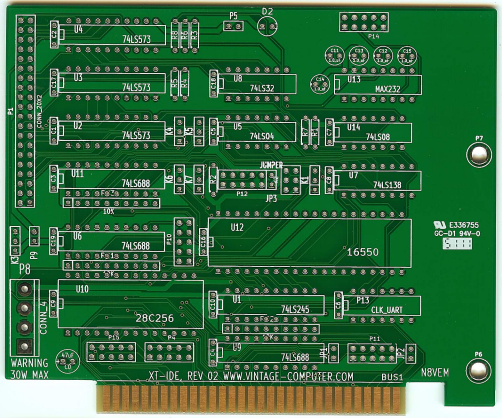
Note: Optional UART hardware not fitted in top photo.
Introduction
The XT-IDE board allows a modern IDE hard drive or CF card to be used as a storage medium on vintage IBM PC XT and compatible computers. It also includes provision for an additional serial port, which can be used to serve files off a modern host computer.
Features include:
- Works “as you'd expect” as a functioning IDE controller for 8-bit ISA slots. Just attach up to 2 PATA hard drives to a cable and start using it.
- No drivers to load. All HDD support is added through the onboard boot ROM (technically, a 'BIOS expansion ROM').
- Onboard boot ROM (EEPROM type of ROM) can be flash upgraded. No ROM programmer required.
- Supports drives of any size. There are restrictions in the operating system though (DOS 6.22 limits drive size to 8.4Gb)
- The UART (optional) allows the card to boot over a serial link from a high speed modern computer, reading and writing to an .IMG file that represents a bootable hard disk image.
- Supports most Compact Flash devices attached to CF→IDE converters.
- Supports most DOM devices. (see test results page below)
- Adds a boot menu (optional) to your machine- Boot to any drive attached to your computer, including the B: drive!
- Onboard power connector for powering either CF devices (5 volts) or standard HDDs (12 volts) for machines without spare wiring from the power supply (such as the IBM model 25).
This board was a project on the Vintage Computer Forum, and a large amount of useful information can be found in forum threads there. See the links in the “Build Information” section below to relevant threads on this forum.
Hardware Documentation
Current Version: XT-IDE V2
Schematic: printing_xt-ide_v2-sch.pdf
Board Layout: printing_xt-ide_v2-brd.pdf
KiCAD Files: isa_xt-ide_v2-002.zip
Build Information
Vintage Computer Forum Links
Note - the Vintage Computer Forums moved to a new URL in February 2016. All links below point to the new URL.
BIOS Links
- XT-IDE Universal BIOS Source Repository (possible out of date since Google Code is frozen)
- Lo-tech XT-IDE Universal BIOS Wiki Page (includes newer binary releases)
Presently (November 2013), 'v2.0.0 beta 3' is the latest version. When configuring that BIOS, the 'device type' option needs to be set according to the mode that the XT-IDE revision 2 card is jumpered for:
- XT-IDE rev 2 jumpered for Compatibility mode: Set the 'device type' option to 'XTIDE rev 1'
- XT-IDE rev 2 jumpered for Hi-Speed mode : Set the 'device type' option to 'XTIDE rev 2 or modded rev 1'
Parts List
Assembly Notes
Some notes for building the card:
- SIP resistors are mounted with the printing facing down, toward the ISA connector.
- The 14 decoupling caps are not polarity sensitive.
- The 5 caps around the 232 driver IC are polarized. Note the + mark on the PCB must match the + on the cap.
- The single large cap is also polarized.
- The LED is polarized. It has one side flattened to indicate polarity. Match the flattened side of the LED with the PCB silkscreen.
- Pin 1 for the IDE connector is down, closest to the ISA connector.
- Pin 1 for the 9 pin serial header is on the left side (look for the square hole on the back of the PCB).
- The card can self-program the EEPROM, so don't worry about needing an EEPROM burner to get a complete card. In fact the card can actually function AS an EEPROM programmer; the XTIDECFG flash program available with the BIOS allows for ROMs between 8 and 64k to be written.
Modes of Operation
There are two possible hardware 'modes' of operation. The mode that is used is selected by jumpers on the card.
- Compatibility Mode - 'Compatibility' means IDE hardware compatibility with an (unmodified) XT-IDE revision 1 card. If your revision 2 card is jumpered for Compatibility mode, the 'device type' option within version v2.0.0 beta 3 of the 'XTIDE Universal BIOS' needs to be set to 'XTIDE rev 1'.
- Hi-Speed Mode - During production of the XT-IDE revision 1 card, some people made a modification to both the card and the BIOS software, in order to make the card run faster. That modification to revision 1 cards became known as the 'Chuck mod'. The hardware component of that modification (there is both a hardware and software component) has been incorporated into the XT-IDE revision 2 as 'Hi-Speed Mode'. As for the software component of the modification, that is in the BIOS: If your revision 2 card is jumpered for Hi-Speed mode, the 'device type' option within version v2.0.0 beta 3 of the 'XTIDE Universal BIOS' needs to be set to 'XTIDE rev 2 or modded rev 1'.
Other Information
Changing I/O Addresses
Changing the I/O address requires a BIOS re-flash so that the BIOS knows where you moved the I/O space to.
P9 Jumper
P9 near the IDE connector is a power enable/disable jumper to pin 20 (Vcc) If you are using a DOM or other low power device that can accept 5 volts on pin 20 to power the device itself, put a jumper on P9. Then you won't need an external power cable.
Resistor R6
A design error in the XT-IDE revision 1 card, which carried through to the revision 2 card, concerns the 'cable select' functionality (CS) of the IDE specification. Discussion of this design error in the XT-IDE appears in the XT-IDE thread starting here.
For a lot of XT-IDE users, that won't be a problem, because the IDE device in use will probably be set to 'master', not CS.
If the IDE device that you attach to the XT-IDE does not have master/slave/CS jumpers, then it is possibly using CS. Note that a lot of IDE-to-CF adapters have master/slave jumpers.
Should you wish to correct the design error, replace R6 with a wire link (photo), or bridge the ends of R6 using a piece of wire.
Jumper Settings
The diagrams below document the jumper settings for the XT-IDE Rev2 board. Click for larger images. Detailed Basic IDE, Boot ROM, and Optional UART diagrams courtesy of http://www.minuszerodegrees.net/
Summary:

Basic IDE Functionality:

Boot ROM:

Optional UART:

Booting via UART
Supporting software, serdrive.exe and FreeDOS.img, is here. Click here for instructions.
Where in those instructions it specifies “SerDrive ImageFile.img”, you will use “SerDrive FreeDOS.img”.
Note that IMG drives show up as normal drive letters in DOS. So you have the option of booting to a local drive and then accessing the serial drive as D: or E:.
Known Problems
SYMPTOM: The XT-IDE card 'sees' the CF card, but will not boot from it.
CAUSE: Non-standard boot sector on CF card.
FIX: Use the /MBR option of FDISK.EXE (from DOS version 5 or later) against the CF card. So, after booting from a DOS 5 (or 6) boot floppy, enter: FDISK /MBR
SYMPTOM: On an IBM 5150 or 5160, the XT-IDE card 'sees' the CF card, but will not boot from it.
CAUSE: Motherboard configuration switches set for 3 or 4 floppy drives.
NOTE: Seen with XT Universal BIOS verion 'v2.0.0 beta 3'. Other versions may be affected.
NOTE: Two CF cards were used - one containing DOS 3.3 and the other containing DOS 6.22
Photo Gallery
File List
| Filename | Filesize | Last modified |
|---|---|---|
| isa_xt-ide_v2-002.zip | 90.5 KiB | 2015/11/13 02:45 |
| printing_xt-ide_v2-brd.pdf | 684.9 KiB | 2015/11/13 02:40 |
| printing_xt-ide_v2-sch.pdf | 185.0 KiB | 2015/11/13 02:40 |
| xt-ide-jameco-mouser-bom.txt | 2.0 KiB | 2016/02/28 14:57 |
| xt-ide_v2.lst | 5.8 KiB | 2015/11/13 02:40 |
| xt-ide_v2_front.png | 443.4 KiB | 2015/11/13 02:55 |
| xt-ide_v2_front_and_back.pdf | 776.2 KiB | 2015/11/13 02:40 |
| xtide_rev2_settings.png | 43.5 KiB | 2015/11/13 02:40 |
For information on the original XT-IDE V1, see the XT-IDE V1 Archive Page
Other Implementations
The XT-IDE started as a project on the Vintage Computer Forums, and the V2 board documented here was one of the major products of that project. Since that time, several other hardware implementations have been created:
- Sergey's XT-CF-Lite V4 (also available on the Board Inventory page)
- A CPLD implementation documented at the Dangerous Prototypes XT IDE disk controller page - note this implementation may have never been completed/tested